 Kirsch Labs
In review on the Chrome Web Store
Tab Harbor
Save browser tab sessions locally. Restore your research and keep a portable backup.
Free early access. No price, purchase flow, trial or subscription.
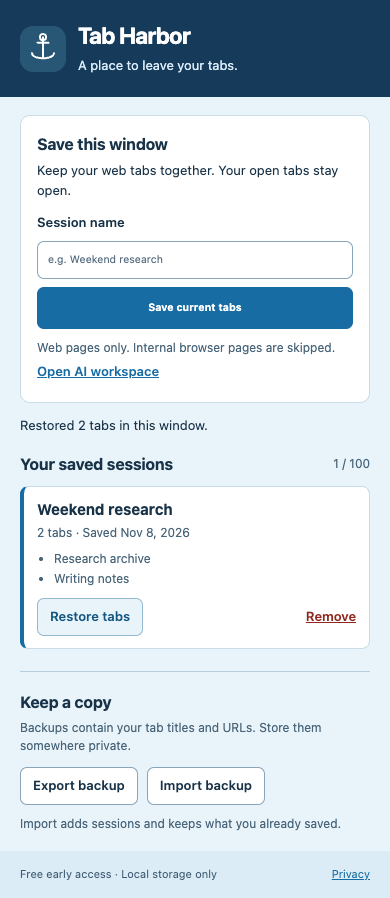
Tab Harbor is a Chrome extension that saves the web pages in your current window as a named session, so you can come back to them later. Your open tabs stay open when you save. Restore a session when you are ready to continue, remove the ones you no longer need, and keep a JSON backup in a location you control.
Who it is for
People who pause research projects and want to reopen their browser context later, without an account or cloud sync.
What it does
- Save the web tabs of the current window as a named session.
- Restore a saved session in the current window with one click.
- Remove a session, with Undo while the popup is still open.
- Export your sessions to a JSON backup file. Importing a backup adds its sessions and keeps the ones you already have.
- Only http(s) pages are saved. Browser pages, file URLs, executable URL schemes and URLs with embedded credentials are skipped on save and rejected on import. A backup with a conflicting session ID is rejected as a whole.
- Up to 100 sessions, 250 unique web tabs per session and 2 MB of backup data.
- Keyboard-accessible controls.
Optional on-device AI naming
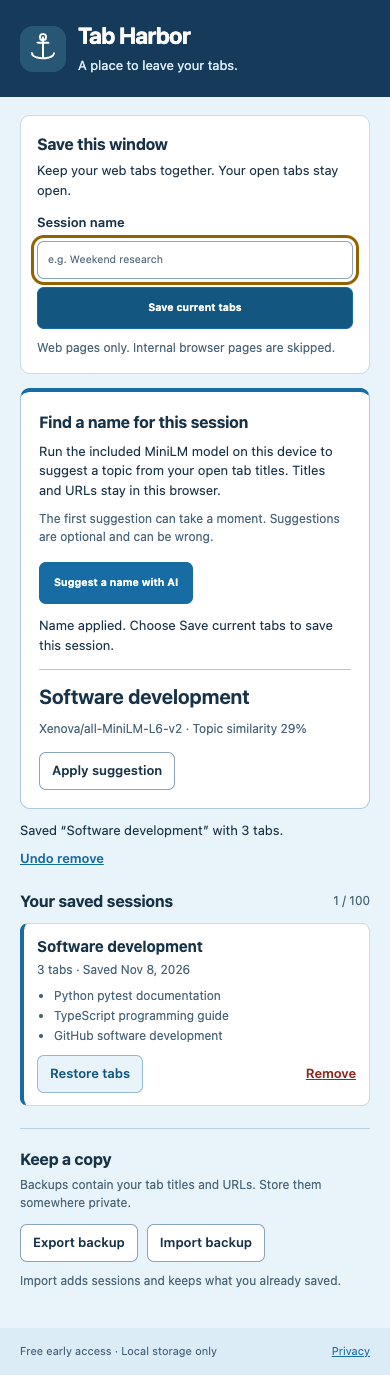
Open the AI workspace from the popup and choose “Suggest a name with AI”. A MiniLM sentence-transformer model (Xenova/all-MiniLM-L6-v2, Apache-2.0) bundled with the extension compares your open tab titles with eight general topics, such as Travel planning or Software development, and suggests one. It runs on this device only after your click; tab titles and URLs are not sent to a model provider.
Review the suggestion and apply it only if it fits. Suggestions can be wrong, and saving, restoring and backups work without them. If the model cannot load, name the session yourself and try again later.
Permissions
tabs: reads the titles and URLs of tabs in the current window when you save a session or ask for a topic suggestion (titles only, processed locally), and opens pages when you restore.storage: keeps saved sessions in this browser profile.
Privacy in plain language
Sessions are stored in this browser profile using Chrome’s local extension storage. There is no account, server or cloud sync, and no analytics, ads or remote scripts. Exported backups contain tab titles and URLs, so store them somewhere private. Removing the extension removes its local data; export a backup first if you want to keep it.
Read the Tab Harbor privacy policy
Price
Tab Harbor is in free early access. There is no price, purchase flow, trial or subscription, and no payment details are requested.
Frequently asked questions
Does Tab Harbor send my tabs to a server?
No. Saved sessions stay in this browser profile, in Chrome’s local extension storage. There is no account, server or cloud sync, and the optional AI naming runs on your device.
Which tabs are saved?
The web tabs of the current window. Only http(s) pages are saved; browser pages, file URLs, executable URL schemes and URLs with embedded credentials are skipped.
Can I move my sessions to another browser profile?
Export a JSON backup and import it with Tab Harbor in the other profile. Importing adds the backup’s sessions and keeps the ones already there.
What happens to my sessions if I remove the extension?
Removing the extension removes its local data. Export a backup first if you want to keep your sessions.
Do I have to use the AI naming?
No. It runs only when you choose “Suggest a name with AI”, and saving, restoring and backups work without it.
Is Tab Harbor free?
Yes. Tab Harbor is in free early access: there is no purchase flow, license key or subscription in this release.
Support
Questions, bug reports and privacy requests: support@kirschlabs.com. See the support page for what to include.